Change language settings in Alexion CRM
Alexion CRM comes in three languages: Dutch, English and German. Switching between these languages is very easy.
Step-by-step adjusting language settings
For Alexion CRM version 8.0 and above
- Go to menu Extra
- In the menu bar, choose the "Languages" button
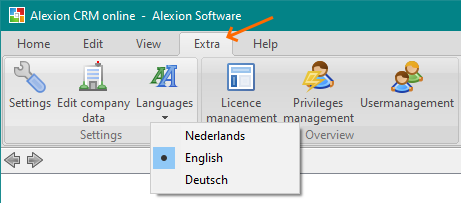
- You can then choose from
- Nederlands
- English
- Deutsch
- After making the choice you need to restart Alexion CRM to apply it
For Alexion CRM versie 5.2 to 7.4
- Go to menu Extra > Talen
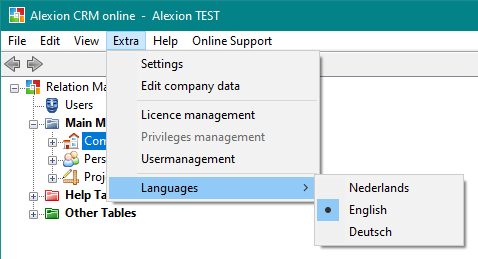
- You can then choose from
- Nederlands
- English
- Deutsch
- After making the choice you need to restart Alexion CRM to apply it